
The most expensive hour in your week is the one you spend typing Shopify orders into QuickBooks.
TruSync posts every Shopify order to QuickBooks Online in real time — exact amounts, mapped payment methods, tax on the right jurisdiction — and keeps your Shopify inventory in true sync with QBO. TruSync runs embedded, right inside your Shopify admin.

"We have five different stores that we operate, two of them on Shopify. Keeping the inventory in sync across all of them is a nightmare...when it isn't updated often enough we can end up with out-of-stock orders. TruSync finally keeps us updated real time and solves this!"
Kathi Forsberg | President, Co-Owner, ScandinavianShoppe.com
Why TruSync for Shopify?

Real Time
Orders post the moment they happen — never on a batch schedule

2-Way Inventory
QuickBooks is the source of truth across every channel

Real Transactions
A QBO Sales Receipt per order — not summary journal entries

Every Feature
Plans scale by order volume, not capability
Accurate
Your Shopify tax settings are the source of truth. TruSync posts the exact amounts charged — it never lets QuickBooks recompute tax — and maps every jurisdiction to the right QBO TaxRate so the liability lands on the right TaxAgency.
Built to Keep Your Books Clean
Automatic
Orders, refunds, and cancellations flow to QuickBooks in real time via webhooks. Payouts auto-match to QBO Bank Deposits. Inventory moves both ways, so a sale in QBO and a sale on Shopify can never oversell the same unit.
Accountable
Nothing fails silently. An unmapped payment method or tax jurisdiction becomes a visible exception on your dashboard — with Trudy, TruSync's built-in AI assistant, ready to explain what happened and fix it with your OK.
Every Shopify Transaction, Posted Correctly
Shopify orders post to QuickBooks Online as real Sales Receipts — one per order, carrying the order number, line items, discounts, shipping, and tax exactly as Shopify charged them. Payment methods map to your QBO payment methods — Shopify Payments included — and when payouts land, TruSync matches them to QBO Bank Deposits automatically, fees split out, your bank feed matching on the first try.
-
Sales Receipts, not summaries — drill into any order from inside QuickBooks
-
Payment-method mapping — Shopify Payments, PayPal, credit card, each to its QBO counterpart
-
Payouts reconciled to QBO Bank Deposits, with fees as expense lines
-
Refunds and cancellations post with tax from the original order — QBO never re-computes it
Connect. Configure. Sync.

Connect
Install TruSync from the Shopify App Store — it runs embedded in your admin — then connect QuickBooks Online with a one-time OAuth handoff to Intuit.
Configure
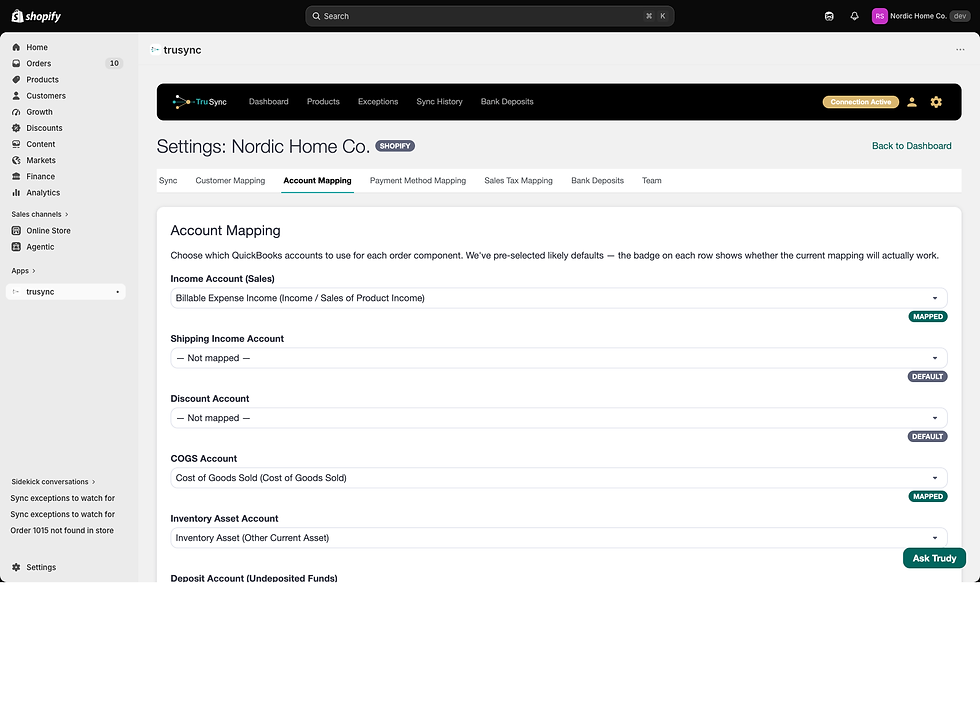
A guided setup wizard walks you through mapping customers, accounts, payment methods and sales tax. TruSync selects likely matches to your existing QBO items in the background.
Sync
New orders post to QuickBooks the moment they happen. Backfill historical orders as far back as you want — or start fresh from today.
TruSync only creates new documents in QuickBooks and reads your chart of accounts — it never modifies existing data.
One Customer, Not a Thousand
In January 2026, a leading connector quietly removed customer mapping — and suddenly every order created a brand-new customer in QuickBooks. Thousands of one-order "customers" burying the real ones. We were merchants ourselves; we felt it the same week our customers did.
TruSync maps every order from your store to one QBO customer you choose — most merchants use the storefront name, like "Shopify - YourStore.com." Your customer list stays clean, and your storefront remains the system of record for buyer details.
Meet Trudy — Your Built-In AI Assistant
Every TruSync dashboard includes Trudy. Ask in plain language why the books won't balance, why an order didn't post, or how to map a new product — Trudy reads your store and your QuickBooks, explains what's happening, and fixes it with your OK. You don't have to be an accountant.
The only AI assistant in its category!


Starter
10,000
Orders per Year
$25.00 / month
Every plan includes every feature — plans scale by order volume, not capability. Pricing is per channel, per month. Billed through Shopify — it appears on your regular Shopify bill.
Simple, Order-Based Pricing

Growth
25,000
Orders per Year
$50.00 / month


PRO
100,000
Orders per Year
$100.00 / month

enterprise
1,000,000
Orders per Year
$250.00 / month
Start with a free trial. No contracts, no commitments, no surprises.
Shopify + QuickBooks, Answered
Yes. TruSync connects your Shopify store to QuickBooks Online and posts every order as it happens — a real Sales Receipt per order, with payment methods, tax, and payouts handled. Install it from the Shopify App Store.
As individual Sales Receipts carrying the Shopify order number, line items, discounts, shipping, and the exact tax your storefront charged. Not summary journal entries — you can drill into any order from inside QuickBooks.
Yes, in both directions. QuickBooks is the source of truth: a sale or stock change anywhere updates every connected channel, so you never sell what you don't have.
Nothing fails silently. An order TruSync can't post becomes a visible exception on your dashboard and you get an email alert. Fix the mapping once and affected orders post automatically.
Yes. Choose how far back to backfill and TruSync imports historical orders through the same pipeline, with duplicate detection so nothing posts twice.
Yes. Shopify Payments payouts are reconciled automatically — TruSync matches each payout to a QBO Bank Deposit with fees split out, so the deposit in your bank feed matches to the penny.

TruSync, a div. of
19 Crestwood Street
Worcester, MA 01605
(857) 777-1119
US Toll Free (844) 321-1119